On July 29, our workshop “Effective prompting with AI – How do I prompt correctly?” entered its second round. After the great interest at the premiere, it quickly became clear: this topic is moving – and we want to give even more people the opportunity to immerse themselves in the fascinating world of AI assistance systems.
Led by Karla and Yvonne, the day revolved around the question: How do I formulate prompts so that AI tools like ChatGPT deliver precise, creative and practical answers?
Together, we worked out why the right input is crucial for the output, how to break down complex tasks into understandable steps and which creative tricks turn a standard answer into a real wow result.
In addition to practical examples, there was plenty of room for questions, discussions and trying out your own ideas. Many participants took the opportunity to test their professional and private use cases directly in the workshop – from marketing texts and customer service optimization to finding ideas for new projects.
Our conclusion:
AI is not a sure-fire success, but a powerful tool when used in a targeted manner.
Good prompts save time and nerves – and are often a lot of fun.
The exchange of ideas is at least as valuable as the technology itself.
We would like to thank everyone who attended or showed interest!
If you would also like to delve deeper or have specific questions about integrating AI into your day-to-day work, Matthias and Yvonne look forward to hearing from you.
https://2be-markenmacher.de/wp-content/uploads/effektives-prompting-ki-workshop-news-2be-die-markenmacher.jpg6151400Katharina Zaunerhttps://2be-markenmacher.de/wp-content/uploads/logo-twobe-white-Kopie.pngKatharina Zauner2025-08-15 15:40:062025-08-15 15:40:06“Effective prompting with AI” – second round of workshops
The way presentations are created has changed dramatically in recent years.
With the advent of artificial intelligence (AI), new tools are now available that can significantly simplify and automate the process of creating presentations.
But how do these AI-driven presentations compare to traditional, manually created presentations?
We wanted to compare the pros and cons of both approaches, especially in the context of sales and branding.
Classic PowerPoint presentation
Strengths:
Individuality and creativity: Classic PowerPoint presentations allow for a high degree of individuality.
Each slide can be designed exactly according to the creator’s ideas, which is particularly important in order to present the brand uniquely and consistently.
Control and precision: As each slide is created manually, the creator has full control over the design and content.
This is particularly advantageous in sales, where every piece of information must be conveyed precisely and purposefully.
Adaptability: Manual presentations can be flexibly adapted to different target groups and markets, which improves the visibility of the brand in different contexts.
Weaknesses:
Time-consuming: The biggest disadvantage is the considerable amount of time required to create it.
This can be a particular disadvantage in dynamic markets where rapid adjustments are required.
Dependence on design skills: The quality of the presentation depends heavily on the design skills of the creator, which can lead to inconsistent results.
AI-driven PowerPoint presentation
Strengths:
Efficiency and speed: AI-supported tools such as Tome, Beautiful.ai or Gamma can create appealing presentations in the shortest possible time.
This not only saves time, but also makes it possible to react quickly to changes in the market and adapt the sales strategy accordingly.
Automated design suggestions: These tools provide intelligent design suggestions based on proven templates to help create visually appealing and professional slides, even without in-depth design knowledge.
Data integration: Some AI tools enable the automatic integration of real-time data and interactive elements, which makes the presentation more dynamic and appealing.
This can increase the visibility and engagement of the target group.
Weaknesses:
Lack of individuality: Despite the high level of efficiency, the design options are often limited, which can lead to presentations that appear less individual and therefore differentiate the brand less strongly.
Dependence on technology: The quality of the presentation depends heavily on the reliability of the AI tools.
Technical problems or limitations in functionality can impair the presentation.
Cost: Many advanced AI tools are paid for and require subscriptions, which can be a hurdle for smaller companies in particular.
Comparison and conclusion
A direct comparison shows that classic PowerPoint presentations score points above all for their individuality and adaptability, but require a great deal of time.
AI-driven presentations, on the other hand, impress with their efficiency and the ability to achieve professional results quickly, which is particularly advantageous in a fast-paced sales environment.
For companies that value a strong brand individuality and are willing to invest in the creative process, the classic method certainly remains the better choice.
For those who need quick results and can rely on automated processes, AI-driven presentations offer clear advantages, especially when it comes to visibility and scalability in sales.
Overall, the choice between a classic and an AI-driven presentation is a question of priorities – be it creativity and control or efficiency and speed.
In the end, as is so often the case, it is a decision that can only be made on an individual basis: Both approaches have their justification and, depending on the context and objectives, can offer decisive advantages.
We hope that we have been able to make the decision a little easier with this article 🙂 Curious? Our contacts will be happy to help you: Katharina Zauner +49 (0)911 / 47 49 49 53zauner@twobe.deLinkedIn
https://2be-markenmacher.de/wp-content/uploads/banner-powerpoint-presentation-ki-news-2be-die-markenmacher.jpg7041600Katharina Zaunerhttps://2be-markenmacher.de/wp-content/uploads/logo-twobe-white-Kopie.pngKatharina Zauner2024-08-09 14:07:002024-08-13 14:41:06Classic vs. AI-driven PowerPoint presentation: a comparison
If you only have a small budget for your projects and can’t spend a larger budget on self-composed music or licenses, you fortunately have a large selection of different options for obtaining suitable music these days.
The question“Should we use free or AI-generated music for our current project?” was recently posed by one of our customers.
Together with him, and based on our experience in the field of audio and AI, we were able to give him a well-founded recommendation.
We are happy to share our findings with you here to help you make your decision.
Free music using Pixabay as an example
Pixabay offers a variety of free music tracks and sound effects created by different artists.
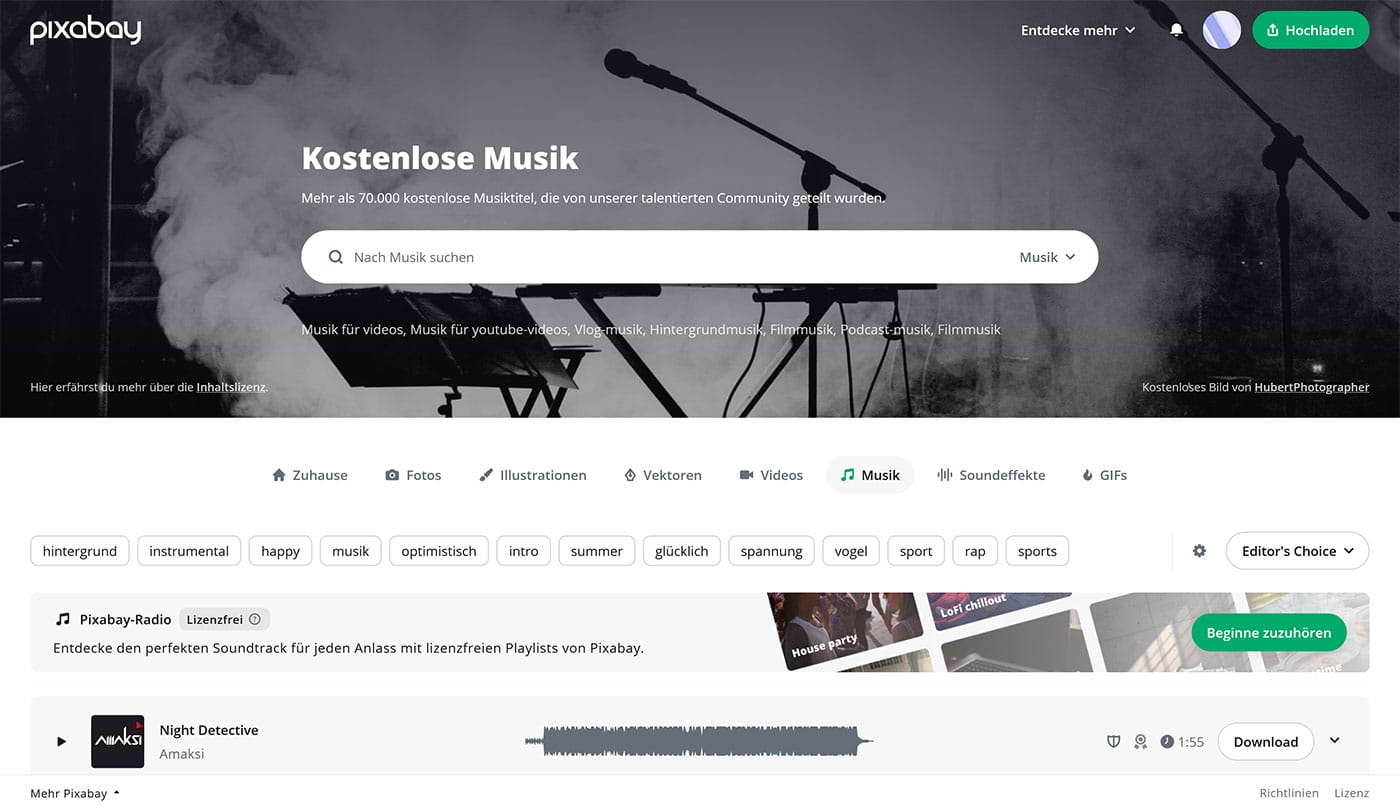
Pro:
Created by real artists, therefore clear legal situation.
Over 90,000 free sound effects available.
Contra:
Long search times to find suitable music.
Different license conditions, not always suitable for commercial use.
AI-generated music using the example of Suno
Suno is an innovative AI music generator that creates unique pieces of music in a matter of seconds.
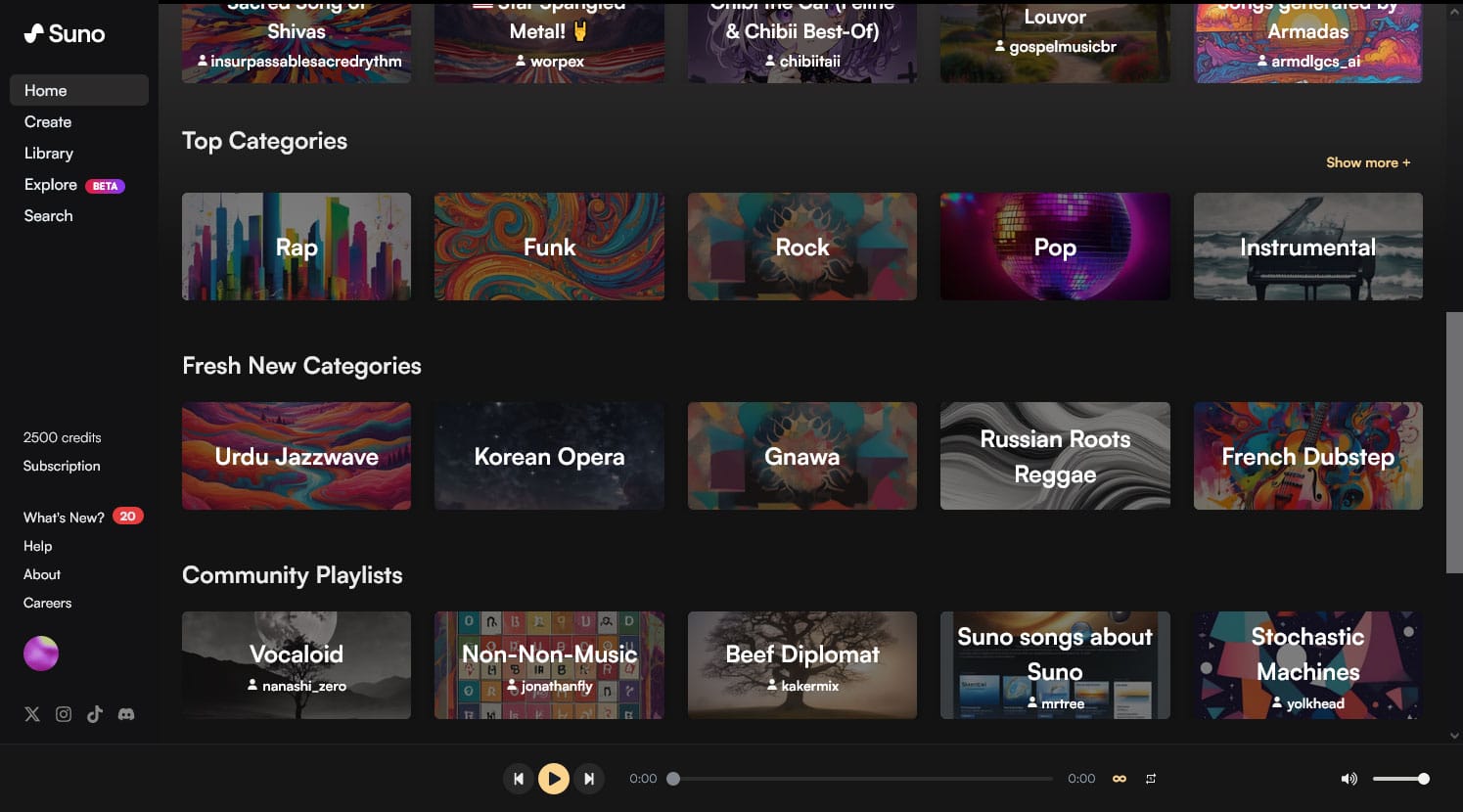
Pro:
Quickly create unique pieces of music.
Possibility to customize genre, style, mood and instruments.
Flexible and customizable for different projects.
Contra:
Commercial use requires a paid subscription.
Requires practice and precise input for optimum results.
Unclear legal situation with AI-generated content, as this can change constantly.
How does the generation of songs by AI actually work?
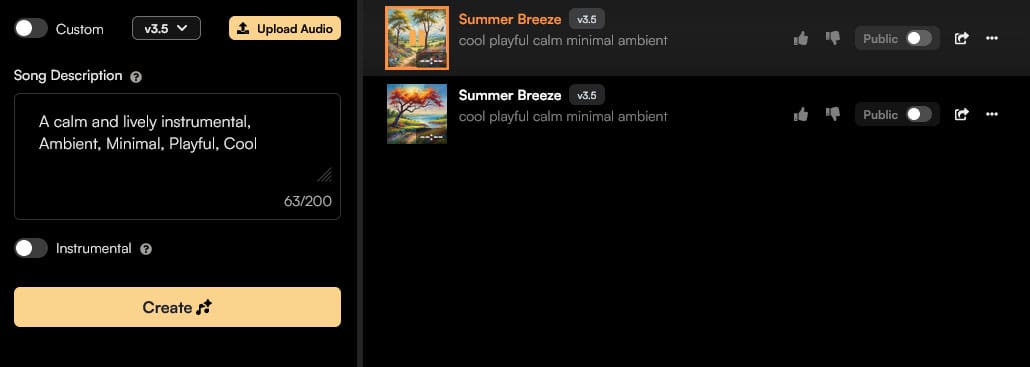
Let’s go through the example using the Suno platform: First we create an account, then you can describe the song you have in mind in the song description (left in the picture), similar to all AI programs: the more precisely described, the better.
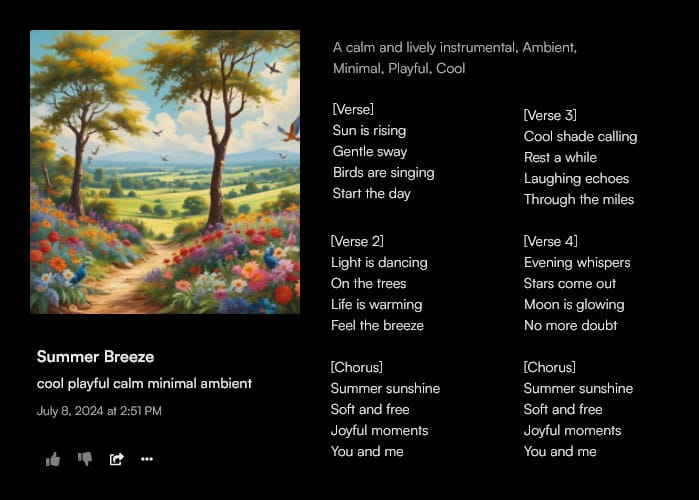
Then 2 variants of songs are created for the description entered. Both instrumentals and vocals with lyrics can be generated, which doesn’t sound too bad in our opinion, especially if you need a song as background music, the creations are very suitable.
Conclusion
Both options offer advantages and challenges.
Free music from platforms like Pixabay can be a good choice for projects with clear licensing requirements and no pressing timelines.
AI-generated music from providers such as Suno, on the other hand, offers high flexibility and fast results, but requires a better understanding of the technology and may require additional costs for commercial usage rights.
It is important to always check the terms of use and license requirements to ensure that the music can be used legally.
Especially in the AI sector, the legal requirements and terms of use change quite frequently at the moment, so special attention should be paid to this.
Regardless of whether you choose free or AI-generated music, always consider the aspects of visibility, brand development and the requirements of your own project.
Further aspects
Digitization helper: AI-generated music can change your digital routine more efficiently.
Innovative strength: utilize the possibilities of AI helpersto realize creative and innovative projects.
Helping people to help themselves: Both options offer support in the implementation of creative ideas, be it through broad music libraries or through the adaptability of AI tools.
For the best results in your project, you should decide for yourself and choose the most suitable music option carefully, but also keep all legal aspects in mind. Curious to find out more? Our contacts will be happy to help you: Katharina Zauner +49 (0)911 / 47 49 49 53zauner@twobe.deLinkedIn
https://2be-markenmacher.de/wp-content/uploads/header-kostenlose-oder-ki-generierte-musik-news-2be-die-markenmacher.jpg6591500Katharina Zaunerhttps://2be-markenmacher.de/wp-content/uploads/logo-twobe-white-Kopie.pngKatharina Zauner2024-07-29 10:40:462024-07-29 13:00:35Free or AI-generated music – which is better for my project?
This mode enables people with epilepsy to use the website safely by eliminating the risk of seizures that result from flashing or blinking animations and risky color combinations.
Visually Impaired Mode
Improves website's visuals
This mode adjusts the website for the convenience of users with visual impairments such as Degrading Eyesight, Tunnel Vision, Cataract, Glaucoma, and others.
Cognitive Disability Mode
Helps to focus on specific content
This mode provides different assistive options to help users with cognitive impairments such as Dyslexia, Autism, CVA, and others, to focus on the essential elements of the website more easily.
ADHD Friendly Mode
Reduces distractions and improve focus
This mode helps users with ADHD and Neurodevelopmental disorders to read, browse, and focus on the main website elements more easily while significantly reducing distractions.
Blindness Mode
Allows using the site with your screen-reader
This mode configures the website to be compatible with screen-readers such as JAWS, NVDA, VoiceOver, and TalkBack. A screen-reader is software for blind users that is installed on a computer and smartphone, and websites must be compatible with it.
Online Dictionary
Readable Experience
Content Scaling
Default
Text Magnifier
Readable Font
Dyslexia Friendly
Highlight Titles
Highlight Links
Font Sizing
Default
Line Height
Default
Letter Spacing
Default
Left Aligned
Center Aligned
Right Aligned
Visually Pleasing Experience
Dark Contrast
Light Contrast
Monochrome
High Contrast
High Saturation
Low Saturation
Adjust Text Colors
Adjust Title Colors
Adjust Background Colors
Easy Orientation
Mute Sounds
Hide Images
Hide Emoji
Reading Guide
Stop Animations
Reading Mask
Highlight Hover
Highlight Focus
Big Dark Cursor
Big Light Cursor
Cognitive Reading
Virtual Keyboard
Navigation Keys
Voice Navigation
Accessibility Statement
2be-markenmacher.de
15.02.2026
Compliance status
We firmly believe that the internet should be available and accessible to anyone, and are committed to providing a website that is accessible to the widest possible audience,
regardless of circumstance and ability.
To fulfill this, we aim to adhere as strictly as possible to the World Wide Web Consortium’s (W3C) Web Content Accessibility Guidelines 2.1 (WCAG 2.1) at the AA level.
These guidelines explain how to make web content accessible to people with a wide array of disabilities. Complying with those guidelines helps us ensure that the website is accessible
to all people: blind people, people with motor impairments, visual impairment, cognitive disabilities, and more.
This website utilizes various technologies that are meant to make it as accessible as possible at all times. We utilize an accessibility interface that allows persons with specific
disabilities to adjust the website’s UI (user interface) and design it to their personal needs.
Additionally, the website utilizes an AI-based application that runs in the background and optimizes its accessibility level constantly. This application remediates the website’s HTML,
adapts Its functionality and behavior for screen-readers used by the blind users, and for keyboard functions used by individuals with motor impairments.
If you’ve found a malfunction or have ideas for improvement, we’ll be happy to hear from you. You can reach out to the website’s operators by using the following email
Screen-reader and keyboard navigation
Our website implements the ARIA attributes (Accessible Rich Internet Applications) technique, alongside various different behavioral changes, to ensure blind users visiting with
screen-readers are able to read, comprehend, and enjoy the website’s functions. As soon as a user with a screen-reader enters your site, they immediately receive
a prompt to enter the Screen-Reader Profile so they can browse and operate your site effectively. Here’s how our website covers some of the most important screen-reader requirements,
alongside console screenshots of code examples:
Screen-reader optimization: we run a background process that learns the website’s components from top to bottom, to ensure ongoing compliance even when updating the website.
In this process, we provide screen-readers with meaningful data using the ARIA set of attributes. For example, we provide accurate form labels;
descriptions for actionable icons (social media icons, search icons, cart icons, etc.); validation guidance for form inputs; element roles such as buttons, menus, modal dialogues (popups),
and others. Additionally, the background process scans all the website’s images and provides an accurate and meaningful image-object-recognition-based description as an ALT (alternate text) tag
for images that are not described. It will also extract texts that are embedded within the image, using an OCR (optical character recognition) technology.
To turn on screen-reader adjustments at any time, users need only to press the Alt+1 keyboard combination. Screen-reader users also get automatic announcements to turn the Screen-reader mode on
as soon as they enter the website.
These adjustments are compatible with all popular screen readers, including JAWS and NVDA.
Keyboard navigation optimization: The background process also adjusts the website’s HTML, and adds various behaviors using JavaScript code to make the website operable by the keyboard. This includes the ability to navigate the website using the Tab and Shift+Tab keys, operate dropdowns with the arrow keys, close them with Esc, trigger buttons and links using the Enter key, navigate between radio and checkbox elements using the arrow keys, and fill them in with the Spacebar or Enter key.Additionally, keyboard users will find quick-navigation and content-skip menus, available at any time by clicking Alt+1, or as the first elements of the site while navigating with the keyboard. The background process also handles triggered popups by moving the keyboard focus towards them as soon as they appear, and not allow the focus drift outside it.
Users can also use shortcuts such as “M” (menus), “H” (headings), “F” (forms), “B” (buttons), and “G” (graphics) to jump to specific elements.
Disability profiles supported in our website
Epilepsy Safe Mode: this profile enables people with epilepsy to use the website safely by eliminating the risk of seizures that result from flashing or blinking animations and risky color combinations.
Visually Impaired Mode: this mode adjusts the website for the convenience of users with visual impairments such as Degrading Eyesight, Tunnel Vision, Cataract, Glaucoma, and others.
Cognitive Disability Mode: this mode provides different assistive options to help users with cognitive impairments such as Dyslexia, Autism, CVA, and others, to focus on the essential elements of the website more easily.
ADHD Friendly Mode: this mode helps users with ADHD and Neurodevelopmental disorders to read, browse, and focus on the main website elements more easily while significantly reducing distractions.
Blindness Mode: this mode configures the website to be compatible with screen-readers such as JAWS, NVDA, VoiceOver, and TalkBack. A screen-reader is software for blind users that is installed on a computer and smartphone, and websites must be compatible with it.
Keyboard Navigation Profile (Motor-Impaired): this profile enables motor-impaired persons to operate the website using the keyboard Tab, Shift+Tab, and the Enter keys. Users can also use shortcuts such as “M” (menus), “H” (headings), “F” (forms), “B” (buttons), and “G” (graphics) to jump to specific elements.
Additional UI, design, and readability adjustments
Font adjustments – users, can increase and decrease its size, change its family (type), adjust the spacing, alignment, line height, and more.
Color adjustments – users can select various color contrast profiles such as light, dark, inverted, and monochrome. Additionally, users can swap color schemes of titles, texts, and backgrounds, with over seven different coloring options.
Animations – person with epilepsy can stop all running animations with the click of a button. Animations controlled by the interface include videos, GIFs, and CSS flashing transitions.
Content highlighting – users can choose to emphasize important elements such as links and titles. They can also choose to highlight focused or hovered elements only.
Audio muting – users with hearing devices may experience headaches or other issues due to automatic audio playing. This option lets users mute the entire website instantly.
Cognitive disorders – we utilize a search engine that is linked to Wikipedia and Wiktionary, allowing people with cognitive disorders to decipher meanings of phrases, initials, slang, and others.
Additional functions – we provide users the option to change cursor color and size, use a printing mode, enable a virtual keyboard, and many other functions.
Browser and assistive technology compatibility
We aim to support the widest array of browsers and assistive technologies as possible, so our users can choose the best fitting tools for them, with as few limitations as possible. Therefore, we have worked very hard to be able to support all major systems that comprise over 95% of the user market share including Google Chrome, Mozilla Firefox, Apple Safari, Opera and Microsoft Edge, JAWS and NVDA (screen readers).
Notes, comments, and feedback
Despite our very best efforts to allow anybody to adjust the website to their needs. There may still be pages or sections that are not fully accessible, are in the process of becoming accessible, or are lacking an adequate technological solution to make them accessible. Still, we are continually improving our accessibility, adding, updating and improving its options and features, and developing and adopting new technologies. All this is meant to reach the optimal level of accessibility, following technological advancements. For any assistance, please reach out to